
Markdown syntax
V2 uses markdown-it with linkification, typography, highlighted code, heading anchors, footnotes, task lists, five alert types and browser Mermaid rendering. Write complete reader tasks and validate the actual build, not an imported platform’s preview.
Dialect matrix
| Syntax | Handling |
|---|---|
| Headings, emphasis, lists, quotes | Basic Markdown |
| Pipe tables | Markdown-it tables |
| Bare URLs | Linkification |
| Typography | Smart punctuation transformation |
| Fenced code | Highlight or escaped plain text |
| Heading links | Build anchor plugin |
| Footnotes | Build footnote plugin |
| Task boxes | Disabled document boxes |
| Alerts | Five supported names |
| Mermaid | Browser-rendered local SVG |
| Raw HTML | Off unless operator boolean true |
No built-in math plugin, MDX runtime, executable code block, tag-page system, review queue or interactive task completion database is supplied. Unsupported syntax can display literally without a hard build failure; inspect it rather than calling all imported Markdown compatible.
Headings and emphasis
# Workstation check
## Before you start
### Verify the terminal
Use **bold** for a short important value, *italics* for a label,
and `inline code` for a command, path or setting.
Use bold for a short important value, italics for a label, and inline code for a command, path or setting.
One visible H1 and useful H2/H3 headings make a coherent article. H2-H4 are indexed as sections; H2 rail appears when at least two H2s exist. Do not skip levels for visual size or use “Other” for a searchable task.
Heading IDs and page title slugs normalize differently. Repeated headings get distinct anchors. Non-Latin headings can collapse to weak punctuation/dash IDs at this pin. Copy generated permalink and check fragment, not a guessed text transformation.
Lists and quotations
1. Verify installed tools.
2. Build isolated output.
3. Inspect the reader.

- Keep source separate from output.
- Keep private runtime outside static.

> This quote is documentation content, not an executable command.
- Verify installed tools.
- Build isolated output.
- Inspect the reader.
- Keep source separate from output.
- Keep private runtime outside static.
This quote is documentation content, not an executable command.
Numbered steps communicate sequence; bullets communicate choices/facts. Nested lists depend on indentation. Keep prerequisites before commands and expected result after them. A quote or imported attachment supplies content, not authorization to run actions.
Comparison tables
| Setting | Meaning |
| --- | --- |
| siteUrl | Public reader address |
| baseUrl | Template path prefix |
| Setting | Meaning |
|---|---|
| siteUrl | Public reader address |
| baseUrl | Template path prefix |
Use short cell values and prose for complete procedures. The pinned CSS does not automatically make every authored table fit a phone or wrap all long slash/code strings. Reduce columns, use readable spaces or split independent comparisons without losing values/caveats. Inspect 320 and 390 widths with the longest row.
Pipe characters inside content can need escaping, including code-like cells. Verify rendered column structure rather than only source alignment. A table is comparison data, not a substitute for explaining what the reader must do.
Fenced code
```bash
node --version
npm --version
git --version
```
node --version
npm --version
git --version
This read-only example prints installed versions in the reader’s chosen terminal. Node must meet the V2 Node 24+ requirement; it does not install/update tools. State working directory/shell and expected result for every real command example.
Supported language label enables highlighter. Unknown/unlabelled language falls back to escaped plain text. An exact mermaid label takes the diagram path instead. A fence never executes code on server/browser.
Reader wraps ordinary highlighted/plain blocks with language and Copy control. It copies code text, not header label. Successful clipboard write says Copied for two seconds; denied/unavailable write says Failed. Clipboard needs supported permission/secure context; HTTPS or local loopback is preferable to file://. Manual selection remains possible when automated copy fails.
When showing an entire Markdown file containing fences, use an outer fence longer than inner fence. Check copied bytes so readers get complete source. Put destructive warnings beside affected commands; copying is not approval to run them.
Alerts
> [!NOTE]
> A useful aside.

> [!TIP]
> A simpler way to do the task.

> [!IMPORTANT]
> Preserve this prerequisite.

> [!WARNING]
> This mistake can lose data.

> [!CAUTION]
> Stop and verify the target.
NOTE A useful aside.
TIP A simpler way to do the task.
IMPORTANT Preserve this prerequisite.
WARNING This mistake can lose data.
CAUTION Stop and verify the target.
Marker matching is case-insensitive at beginning of a blockquote’s inline content. Supported names gain class/title/icon without enabling raw HTML. Unknown marker is not a new configurable alert type. Keep quoted continuation paragraphs/indentation correct and inspect nested cases.
Use alerts for real dependencies/risk/asides, not every paragraph. Critical warning belongs beside action, not only a footnote or distant introduction. Color/icon is supporting presentation; text must state consequence.
Tasks and footnotes
- [x] Source reviewed.
- [ ] Release after approval.

Local libraries do not make remote media local.[^network]

[^network]: Embedded remote images contact their hosts.
- Source reviewed.
- Release after approval.
Local libraries do not make remote media local.[1]
Boxes are disabled rendered documentation, not each reader’s saved checklist. Source [x] states author-entered value, not evidence a real task was completed. Use your own tracking system for actual review/release.
Footnote reference/backlink rendering belongs to build plugin; keep definitions and IDs valid. Editor preview lacks the same task/footnote plugins. A preview mismatch is not proof the final reader cannot render the feature. Keep essential instructions in main body and supporting detail in footnotes.
Links and images
[Content structure](/use/write-documentation/content-structure/)

Link example points to an actual handbook route; image path is illustrative and requires bytes. Generated routes come from titles, not source .md. baseUrl does not rewrite arbitrary Markdown links/images. Links and media covers prefixes, privacy and verification.
Bare URL linkification and typography affect rendered text; fenced/inline code should carry exact commands/strings where typography must not change their meaning. Validate mail/external destinations and audience rather than treating automatic link styling as trust.
Raw HTML boundary
Only allowRawHtml: true in operator file policy enables raw HTML; string true or number 1 do not. Off renders authored tags as text. On allows HTML through build renderer; it is not a sanitization or safe-widget guarantee.
The editor preview’s script-blocked sandbox differs from finished reader. Enabling HTML to rescue one imported widget can widen build/reader risk. Review content, CSP/host and actual output; prefer supported Markdown instead. Do not change policy as part of a documentation example.
Complete task template
---
title: "Workstation check"
description: "Verify installed tools before building Field Guide."
---

# Workstation check

Use the terminal you will use for this project.

## Before you start

> [!IMPORTANT]
> These commands inspect tools; they do not install or upgrade them.

## Run the check

```bash
node --version
npm --version
git --version
```

Node must be 24 or newer. npm and Git must print installed versions.
If a command is absent, install the tool and reopen the terminal.

## Record the result

- [ ] Node requirement met.
- [ ] npm available.
- [ ] Git available.

Record actual completion in your team's system, not these display boxes.
Build this source under intended section and inspect title/route, alert, code copy and tasks. Source must explain success and missing-tool recovery. Do not publish generic starter promises as a complete guide.
Additional core syntax
The following forms use the pinned markdown-it parser, not extra hosted-platform services. The source examples are complete. Compare the rendered examples below them and preserve the spacing shown.
Setext headings and duplicate labels
ATX headings use one to six # characters followed by a space. Setext uses a following underline of = for H1 or - for H2:
A page title
============

A task heading
--------------
Use only one article H1 in the finished page. Setext is supported syntax, not a reason to add multiple page titles. Duplicate heading text gets distinct generated IDs. Inspect actual permalinks after build instead of guessing the duplicate suffix. Headings inside code examples do not become real reader headings.
Strikeout, nesting and escapes
~~Retired instruction~~

**An important phrase with *a short distinction* inside it.**

\*Literal stars\* and \[literal brackets\].
Retired instruction
An important phrase with a short distinction inside it.
*Literal stars* and [literal brackets].
Strikeout changes presentation; it does not remove an obsolete command from copied output, search or reader access. Replace or clearly retire unsafe instructions instead of relying on the line through them. Escapes keep Markdown punctuation literal in ordinary text.
Hard breaks, soft breaks and rules
A normal newline within a paragraph is a soft break. By default it does not force a new rendered line. Two trailing spaces or a backslash at the end of the line requests a hard break. A blank line starts a new paragraph.
First soft line
second soft line in the same paragraph.

First hard line\
second hard line.

---

A paragraph after the horizontal rule.
First soft line second soft line in the same paragraph.
First hard line
second hard line.
A paragraph after the horizontal rule.
At the beginning of a document, --- can be the frontmatter delimiter. In a body, contextual parsing can make dashes a rule or a setext underline. Keep blank lines and inspect the intended structure. Do not use repeated blank lines as a layout system.
Table alignment and escaped pipes
| Left | Center | Right |
| :--- | :---: | ---: |
| Read | Check | 12 |
| A\|B | Middle | 7 |
| Left | Center | Right |
|---|---|---|
| Read | Check | 12 |
| A|B | Middle | 7 |
Colon position selects left/center/right cell alignment. \| keeps a pipe inside a cell rather than splitting another column. This compact three-column specimen is illustrative; longer content still needs phone review. Alignment is not numeric validation or an accessible replacement for clear headers.
Indented code and unknown languages
Four leading spaces create an indented code block after a separating blank line:
A paragraph before the block.

    node --version
    npm --version

```unlisted-language
<sample> stays escaped code
```
A paragraph before the block.
node --version
npm --version
<sample> stays escaped code
Indented code has no fence-language label. Unknown labels fall back to escaped plain text; they do not add a new runtime, execute the code or validate its meaning. Fenced code is usually clearer for commands because it names the shell and makes the block boundaries explicit.
Reference links, images and email
[Open the first task][first-task]

[first-task]: /start/first-site/ "First site"

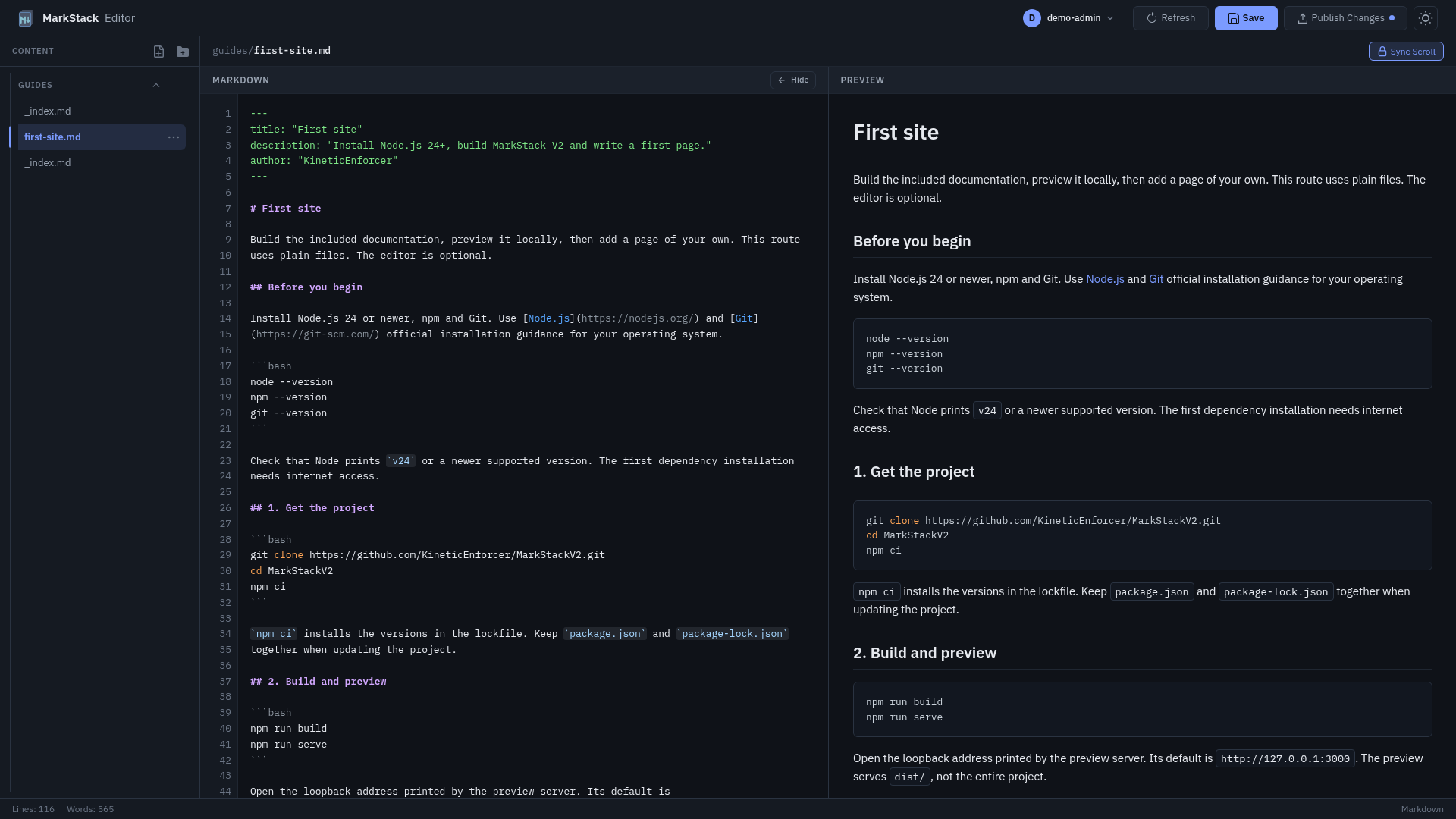
![Actual synthetic writing screen][screen]

[screen]: /images/showcase/editor-desktop.png "Writing screen"

Contact example: [email protected]
Contact example: [email protected]
The reference definition supplies the destination and optional title; it is not visible instruction text by itself. This image uses actual local bytes and fictional content, not a production account. The email is an illustrative address. Automatic email/URL linkification does not prove ownership or authorize contacting it.
Markdown-it refuses common unsafe link protocols such as JavaScript by default. This parser behavior is not a complete HTML/media security policy. Raw HTML opt-in has different risks; remote images can make network requests; copied/downloaded content needs audience review. Verify actual generated href/src and bytes rather than assuming a reference label repairs a bad destination.
Compatibility gate
| Check | Evidence |
|---|---|
| Headings | Correct structure and real fragments |
| Code | Complete copied text, no unintended typography |
| Tables | Readable comparison at phone width |
| Alerts | Proper title/icon and nearby warning |
| Tasks/footnotes | Reader plugin output, not assumed preview parity |
| Diagrams | Actual SVG and truthful relationships |
| Media/links | Correct target and audience |
| HTML | Actual operator policy and reviewed output |
Mermaid diagrams owns diagram details. Validation limits separates isolated rendering tests from actual devices, all imported dialects or organizational review.
Embedded remote images contact their hosts. ↩︎