
Accounts and access
Admin > Users manages authenticated writers, not public-reader memberships. An administrator searches/selects an account and uses Access, Account, Sessions and Activity tabs. On phones, Back to users returns from detail with a discard decision for unsaved access edits.
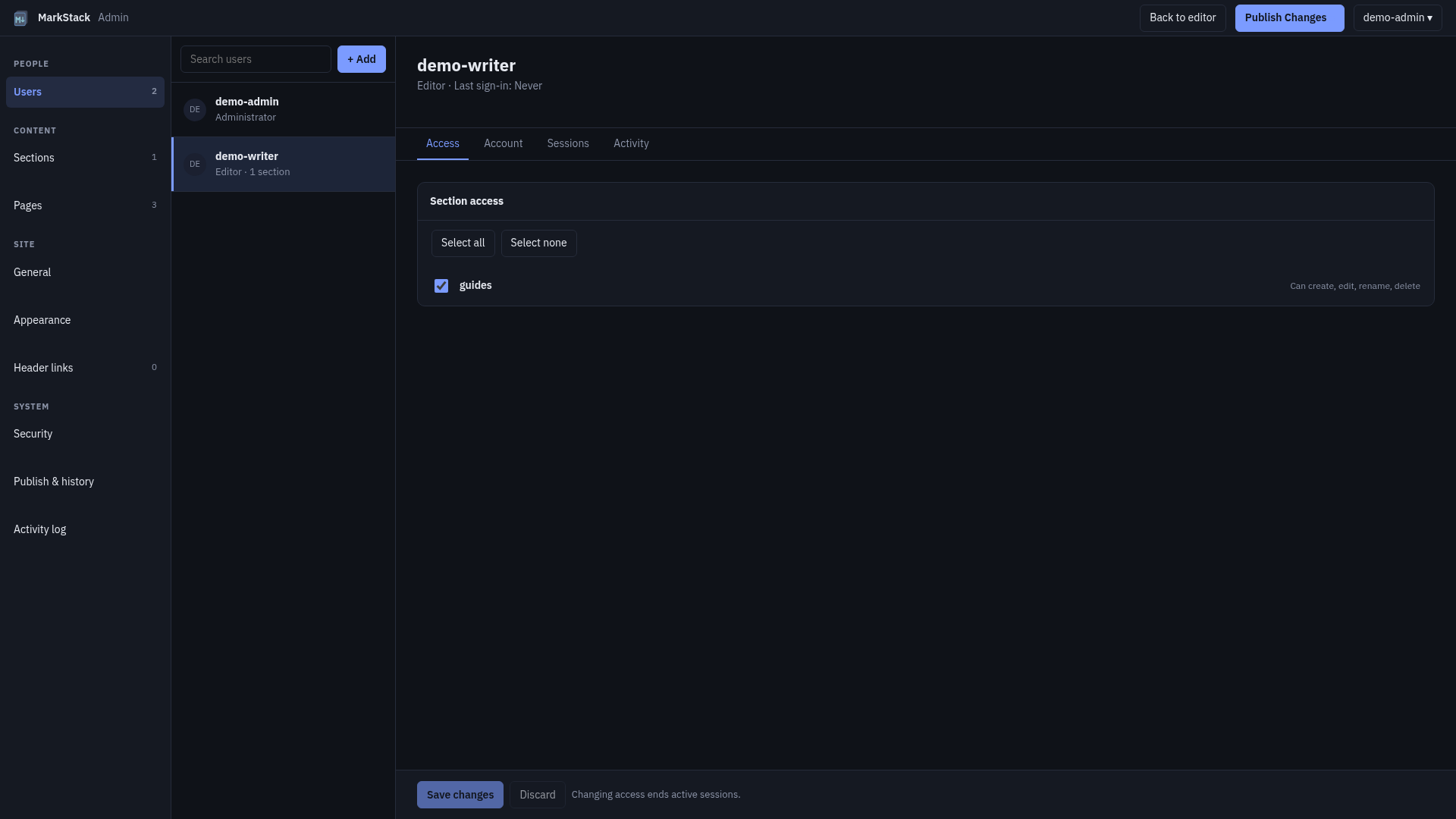
The sample writer has one synthetic section assignment. The image shows a real local V2 interface with fictional accounts, not a production user database.
Permission matrix
| Action | Admin | Editor |
|---|---|---|
| Root content | Yes | No |
| Assigned descendants | Yes | Yes |
| Other section content | Yes | No |
| Top section folder changes | Yes | No |
| Publication | Yes | No |
| Global/account management | Yes | No |
| Own password | Yes | Yes |
“Assigned descendants” means authorized read/write/create/rename/delete inside the physical assigned top-level folder. An editor cannot rename/delete/write the top-level section folder itself or move content to another section. The sidebar title/generated URL is not the assignment key.
The server enforces content path/realpath/role checks. Invalid or outside-content paths have their own rejection; outside an editor’s assignments normally answers 404 rather than exposing another section’s names. A disabled account cannot sign in. Admin has broad content access, so operator trust still matters.
Editor authentication does not protect generated reading. Hidden sections still build/search; published index/media can reveal content. If Field Guide is private, configure and test a separate reader gate covering every artifact path.
Account model and limits
| Field | Contract |
|---|---|
| Name | 2-32 characters; starts lowercase letter/digit |
| Other name chars | Lowercase letters/digits, dot, underscore, dash |
| Role | admin or editor; not later editable here |
| Sections | Valid physical top-level names, deduplicated |
| Disabled | Blocks sign-in; not document deletion |
| Forced password | Next sign-in must change before ordinary APIs |
| Auth version | Persistent value used to invalidate older sessions |
| Timestamps | Creation and actual successful sign-in |
Exact account-name pattern is ^[a-z0-9][a-z0-9._-]{1,31}$. UI trims/lowercases a new name; server/store validation still matters. Role/name are read-only after creation; V2 has no account-rename, role-edit or delete-user management action. Choose ownership/role carefully before creation.
Section names use ^[a-z0-9][a-z0-9_-]*$. A section is a real direct folder under content, not a symlink assignment, root file or arbitrary nested path. Missing assigned folders remain labeled in Access instead of silently removing permission records. Investigate runtime/tree/rename/deletion before clearing them.
Passwords must be text, 12-256 JavaScript string characters and not one of the pin’s exact common weak values compared case-insensitively. This is not a general breached-password lookup or enforced composition policy. Hashing uses scrypt with salt/parameters in stored hash and NFKC normalization. Never publish passwords, hashes, tokens or users files. Security and privacy explains wider perimeter/password boundaries.
Create a fictional writer
- Verify intended server, protected runtime, account owner and existing sections.
- Open Add user. New form defaults editor with no assignments.
- Choose valid fictional username and initial password in the private form.
- Select intended sections for editor; admin has global access and no assignment list.
- Submit and wait for success before treating account as created.
- Confirm list/selected account and intended role/sections.
- Use a separate session/profile to test allowed and denied writing scope.
Creation accepts the chosen initial password and does not automatically set forced-change state. Browser reset has that separate behavior. Do not call the initial password a one-time system-generated credential unless you actually use reset afterward.
Success clears username/password and closes create dialog, then reloads users. Errors display in the form for review. If a response is lost, inspect current list before resubmitting; duplicate name error can mean first creation succeeded. Do not invent a second account to bypass uncertainty.
Deliver credentials through an approved private process, never public documentation, activity notes or issue. This sample is a workflow, not authority to create a real person’s account or disclose their password.
Access drafts and saving
| State/action | Result |
|---|---|
| Toggle | Local access draft, not server grant |
| Select all/none | Changes visible draft checks, including labeled missing assignments |
| Save changes | Sends selected list; controls gated while saving |
| Save success | Draft clears; affected sessions invalidated |
| Save error | Edits remain and “Not saved” is shown |
| Discard | Re-renders selected account’s loaded assignments |
| Select another user | Unsaved discard confirmation |
| Switch detail tab | Access draft remains for later save/discard |
Changing assignments bumps persistent auth version and ends affected sessions. Ask writers to save intended work first and expect fresh login. A checked row on screen is not evidence the server changed. After success, recheck account and role-session allowed/denied paths.
Account actions may require discarding unsaved access first. Sign out everywhere requires save/discard before proceeding. While access save is active, selection/back/actions are gated. Browser leaving/area changes follow unsaved guards; these are local workflow controls, not permission enforcement.
Access does not have a general content revision merge system. Another operator/account command can change state. Refresh/reconcile current assignments before overwriting unexpected changes; users store protects cross-process writes but cannot infer intended concurrent policy.
Account state actions
| Action | Effect and limit |
|---|---|
| Disable | Blocks account; sessions end, source remains |
| Enable | Account becomes usable; version changes |
| Disable self | Refused by server; UI also disables action |
| Last active admin | Store refuses disabling it |
| Browser reset | Editor accounts only; not admin recovery |
| Shell admin reset | Selected admin recovery with hidden new password |
Enable/disable asks for confirmation. Do not disable an account to delete its documents or remove browser drafts. Keeping one enabled admin is a guard, not a full recovery plan; back up protected runtime and retain operator access.
Browser reset generates 20 random characters grouped with hyphens, shows the temporary password once, sets forced-change and ends sessions. It does not automatically enable a disabled editor. Copy/deliver privately before closing; losing display does not justify guessing the password. Another deliberate reset produces a different credential and invalidates prior one.
The next sign-in can access only the forced-change flow’s permitted APIs until password is changed. An ordinary document request failing at that point is not a section-grant failure. Current/new/confirmation fields belong to private password handling, not Markdown drafts.
Administrator shell recovery uses npm run editor:reset-admin -- --user NAME with correct MARKSTACK_USERS_FILE. It sets a new password, enables that admin, clears forced-change and invalidates old sessions on subsequent requests without needing restart. A wrong users path can look like a missing admin; inspect it before creating/resetting elsewhere.
Sessions tab
| Display/action | Meaning |
|---|---|
| Signed-in time | Current-process session creation |
| Last active | Session activity time, not a permanent device log |
| No sessions | No current valid entries; restart can explain it |
| Sign out everywhere | Confirmation, version bump and current-session removal |
| Self selection | Includes current session; returns to sign-in |
Session summaries omit token hashes/CSRF/secrets and do not refresh idle timer. They filter the selected account’s current auth version. Session store is in memory, so restart ends sessions. Refresh account to see current state; a loaded list is not a live stream.
Persistent last-sign-in remains after restart and updates only after an actual successful login, not opening a users row. Clearing sessions does not clear browser Markdown recovery drafts. A fresh sign-in does not automatically publish or recover source.
Account Activity
The Activity tab shows up to 50 retained target-matching events from the bounded audit store, with event/time. It is not all past account activity, full document version history or proof of authorship for failed login names. Full exact filters/cursor are in Security and history.
An audit-write warning can follow a completed account operation. Check actual account/version/session state before repeating reset/disable/save. Repair protected storage/disk and record missing evidence separately; successful later logging does not reconstruct the gap.
Completion checks
| Verify | Evidence |
|---|---|
| Correct account | Actual selected name, role and owner decision |
| Saved scope | Current server assignments, not draft checks |
| Writer session | Allowed synthetic section and outside/root/Admin denied |
| State | Enabled/disabled/forced-change as intended |
| Sessions | Expected invalidation and fresh sign-in |
| Privacy | No credentials/runtime bytes in public output |
| Recovery | Protected backup and admin shell path rehearsed |
Use disposable content for negative permission tests. UI screenshots/tests are not a production account deployment or a full security certification. Validation limits and Private team editor separate measured engine behavior from host/operator work.